When Search Operators people type something into a search engine, they rely on instinct more than strategy. They enter a few words, hit enter, and hope for the best. But the truth is, the internet isn’t just a massive collection of information — it’s a massive collection of searchable information, and search operators are the secret tools that allow you to navigate that ocean like a professional. Whether you’re a researcher, student, marketer, content creator, or just someone who wants cleaner answers faster, understanding search operators gives you a serious edge.
What makes search operators fascinating is that they aren’t new or hidden — they’re simply underused. These tiny symbols, punctuation marks, and simple command-like words can transform a vague query into an extremely precise one. They help you filter results, target specific websites, search for exact words, and even exclude concepts you don’t want to see. Once you get the hang of them, you start wondering how you ever searched without them.
In this article, we’re breaking down what search operators are, why they matter, how they work, and how you can use them to instantly level up your research game. This isn’t just a list — this is a full breakdown designed to help you understand them in a way that sticks. So, grab your curiosity and let’s dive in.
What Are Search Operators? (And Why Do They Matter?)
Search operators are special characters or commands that you add to your query to refine, expand, or narrow your search results. Think of them as shortcuts to precision. Instead of browsing through hundreds of irrelevant pages, search operators help you laser-focus on the exact type of information you’re looking for.
One of the biggest problems people face when searching online is information overload. The internet is too big, and search engines try to be as broad and helpful as possible by default. But broad isn’t always better. If you’re looking for something specific, general searches won’t help — you’ll get lost in thousands of unrelated results. That’s why search operators matter so much. They put you in control, not the algorithm.
Another reason these operators are so valuable is that they save time — a lot of it. You may spend hours digging through results, adjusting your search terms, or jumping between pages. But when you use operators correctly, you jump directly to high-quality, filtered information. That’s the difference between searching and power searching.
The Most Essential Search Operators (And How They Work)
Before you Search Operators an expert, you need to know the core operators. These are the ones you’ll use almost daily once you understand how powerful they are. Some are incredibly simple — just one character — while others are short command-style words. But each of them has a unique effect.
The most common operator is the quotation mark. When you wrap a phrase in quotes, the search engine looks for that exact combination of words. No variations, no rearranging, no guessing. This is helpful when you’re looking for names, quotes, titles, or anything that can easily get distorted in broader searches. It’s one of the simplest yet most effective operators ever created.
Another essential operator is the minus sign, which excludes terms. This is useful when a specific word keeps showing up in your searches but has nothing to do with what you want. For example, searching for a product name might repeatedly bring up reviews when you only want specifications — the minus operator instantly cleans that up. It’s like decluttering your search results with one tiny symbol.
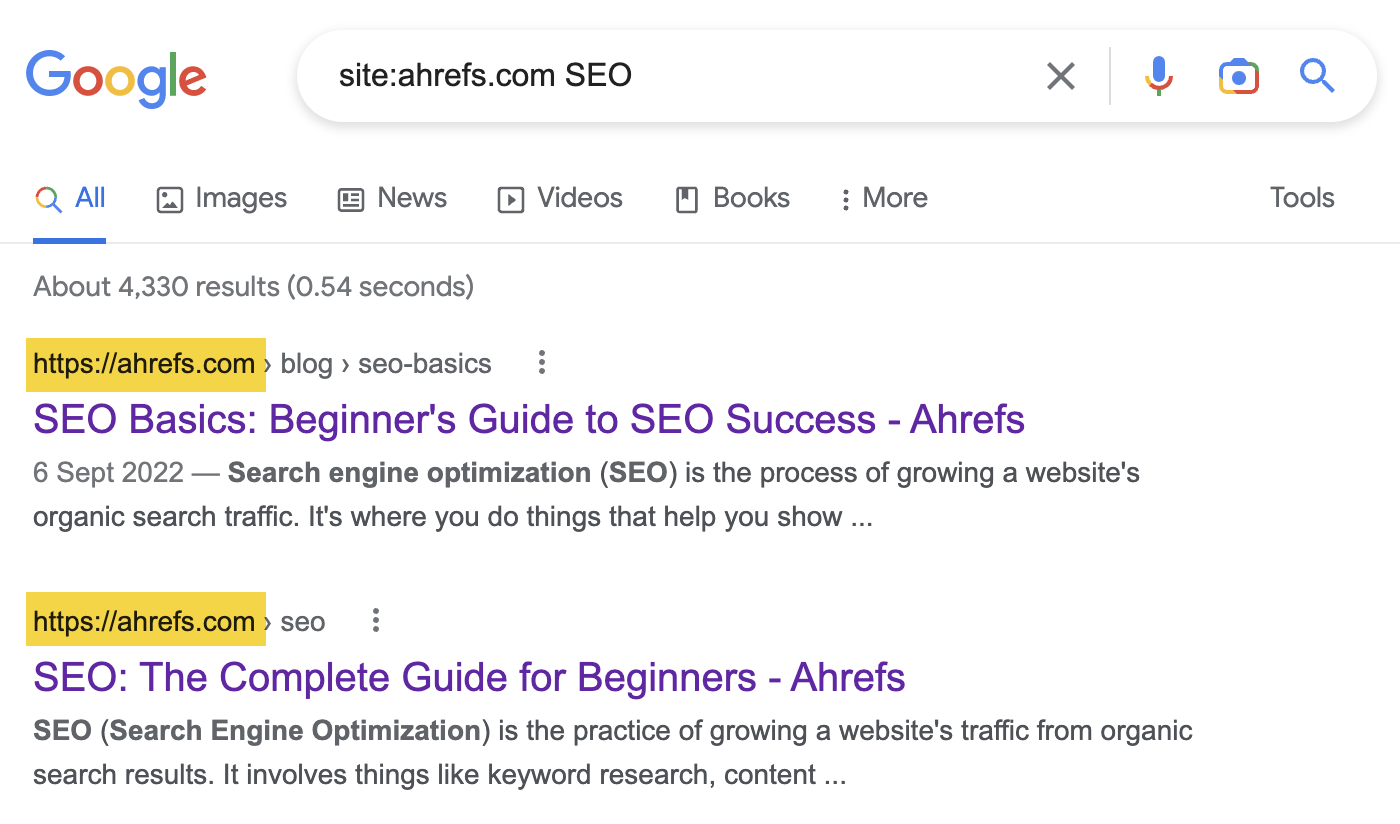
A third common operator is the site search command. This one is unbelievably powerful because it lets you search within a specific website, even if that website doesn’t have a search bar. Want to find information on a government site, a blog, or a news website? Just use the operator, and you get hyper-targeted results from that domain alone.
Advanced Search Operators That Take Your Research to the Next Level
Once you master the basics, you can step into the world of advanced search operators. These take your search precision to a completely different level. They allow you to filter by file type, discover hidden pages, find related websites, track exact phrases, and even locate information that isn’t easy to find through standard queries.
The “filetype” operator is a favorite among researchers and students. It lets you find PDFs, Word documents, PowerPoints, spreadsheets, and more. If you’re working on a school project, business report, or case study, this single operator can unlock documents that rarely appear in regular searches. It’s great for deep research because it brings academic papers, manuals, and official resources right to the surface.
Another advanced operator is “intitle”. This one forces your keyword to appear in the title of the page. Why does that matter? Because pages with your keyword in the title are usually much more relevant than pages that only mention the term once. When you’re trying to find extremely specific articles or blog posts, this operator is a lifesaver.
You can also combine operators to create super-queries. You might search for exact phrases within a specific site, exclude certain terms, and filter by file type all in one line. When you layer these operators, you can uncover information that most people will never see because they’ll never know how to search deeply enough to find it.
Practical Examples of Search Operators in Real-World Use
Understanding operators is one thing — using them effectively is another. Real-world scenarios bring these tools to life. For example, imagine you’re writing an article, working on a report, or trying to verify a fact. Instead of scrolling endlessly, you can use a single precise operator and get your answer instantly.
Let’s say you want to find an exact quote from a public figure, but you only remember a few words. Searching the entire phrase in quotes will bring you much closer to the original source than a normal keyword search would. This not only helps with accuracy but also prevents misquoting or misinformation.
Another example: Suppose you’re researching a product but don’t want to see ads. You can exclude words like “buy” or “price” and instantly remove commercial pages. Or maybe you’re trying to find information on a topic within a specific website that doesn’t offer a proper search feature. The site operator solves that problem in seconds.
Even everyday users benefit from search operators. Whether you’re trying to find recipes without a certain ingredient, tutorials that focus on a specific tool, or articles that contain an exact phrase, these operators give you a shortcut to cleaner, more useful results.
Why Search Operators Are Becoming More Important Than Ever
With the explosion of online content, search engines are now indexing more information than ever before. This means two things: there’s more value available, but also more noise to sift through. Search operators help cut through that noise. They give you control at a time when algorithms are trying to guess what you want.
Search engines are also becoming more personalized, which can sometimes work against you. Your browsing history, location, and behavior influence what you see. But operators override bias. They let you break free from the bubble and retrieve information based on logic, not preferences.
Finally, with AI tools becoming a bigger part of online life, structured search skills are becoming extremely valuable. Search operators remain one of the most reliable ways to retrieve exact, unfiltered information straight from the source. They complement AI, not replace it.
Final Thoughts: Mastering Search Operators Is a Skill Worth Learning
The internet is full of information, but not all of it is easy to find. Mastering search operators gives you a real advantage — it turns you from a casual searcher into a strategic one. Whether you’re working, studying, researching, or simply curious, these small commands help you take back control and get better results in less time.
Once you start using them, you’ll notice how dramatically your search quality improves. Instead of relying on vague queries, you’ll use precise, targeted ones. Instead of digging for hours, you’ll navigate through information effortlessly. And instead of letting the algorithm decide what you see, you’ll be directing it yourself.
you may also read
About the Author